Introduction
The FV4000 is equipped with a Laser Power Monitor (LPM) that automatically adjusts laser output to keep illumination stable and reproducible between sessions. Under normal operation this happens silently in the background.
Occasionally, the system will display a dialog asking you to confirm a laser power adjustment. This guide helps you decide what to do when you see this prompt, and when you need to contact facility staff before proceeding.
-
-
Identify what you saw. When pressing Live:
-
you received a hard error message stating that one or more lasers (e.g. 405 nm, 488 nm) decreased by more than 75%.
-
Do not proceed. Contact facility staff immediately and do not acquire data until the issue is confirmed resolved.
-
a dialog appeared asking you to confirm a laser power adjustment. Proceed to the next step.
-
-
-
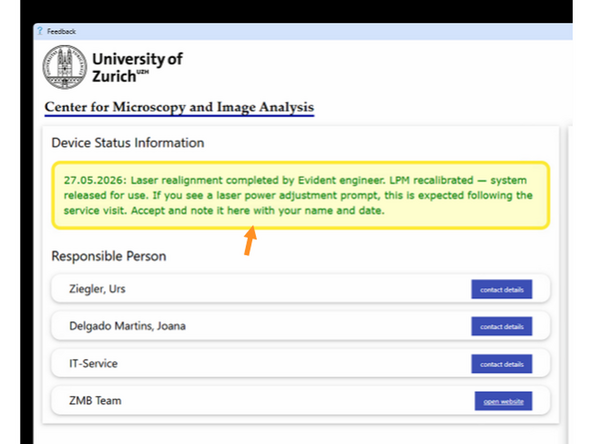
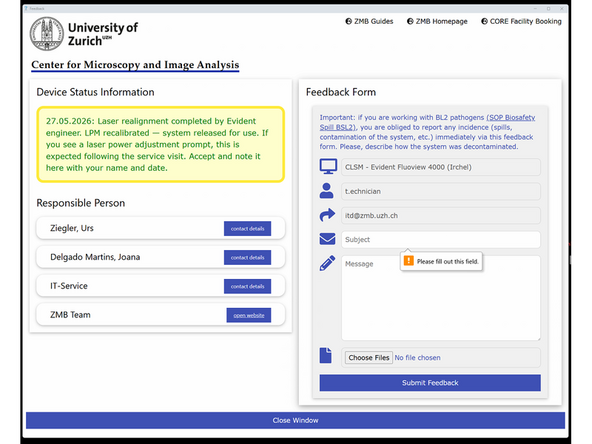
Check the feedback form at the instrument.
-
If you find a note that the system was serviced recently and released for use, proceed.
-
If no such note exists after recent work, treat it as unconfirmed.
-
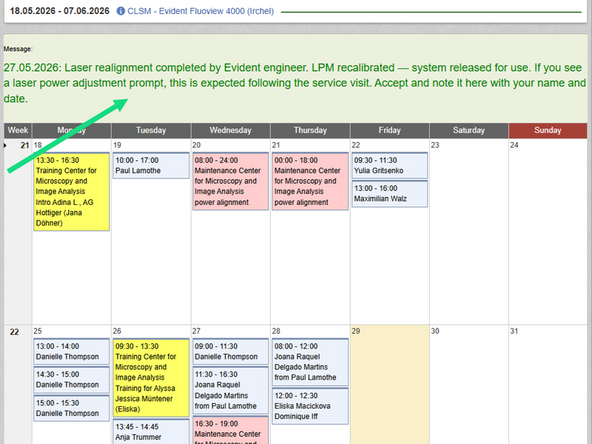
Open the instrument booking system and check for any entries mentioning a service visit, laser realignment, or engineer work in the past 2–4 weeks.
-
If you find nothing, or if the notes mention ongoing issues, contact facility staff before proceeding.
-
-
-
The LPM measures laser power at the fiber input on every session and compares it to the installation baseline.
-
If a small drift is detected, it corrects automatically and silently — you will not see a prompt.
-
The prompt appears when the deviation is large enough that the system wants your confirmation before applying the correction.
-
For small deviations this is normal and safe to accept.
-
For large deviations — e.g. after a laser realignment — the system may be outside its compensation range. The effective laser power at the sample may not match what is recorded in your acquisition settings, making images unreliable for quantitative comparison.
-
-
-
Service visit confirmed in feedback form and system released for use.
-
Accept the adjustment and report using the feddback form.
-
No service visit noted, small or routine deviation accept,
-
Note in feedback form,
-
Monitor images for unexpected behaviour.
-
No service visit noted and deviation seems large, or you are unsure → do not proceed.
-
Contact facility staff before acquiring any data.
-
If you are in doubt, always contact us first. We would rather spend 10 minutes checking than have you lose a dataset.
-